Delete Your Account
How to Delete Your Account
Option 1: Delete from within the app (recommended)
The quickest way to delete your account is directly in the Mindful Brian app:
- Open the Mindful Brian app
- Tap the Account tab in the bottom navigation bar
- Scroll down to the "Account Actions" section
- Tap "Delete Account"
- Enter your password to confirm
- Your account and personal data will be permanently deleted
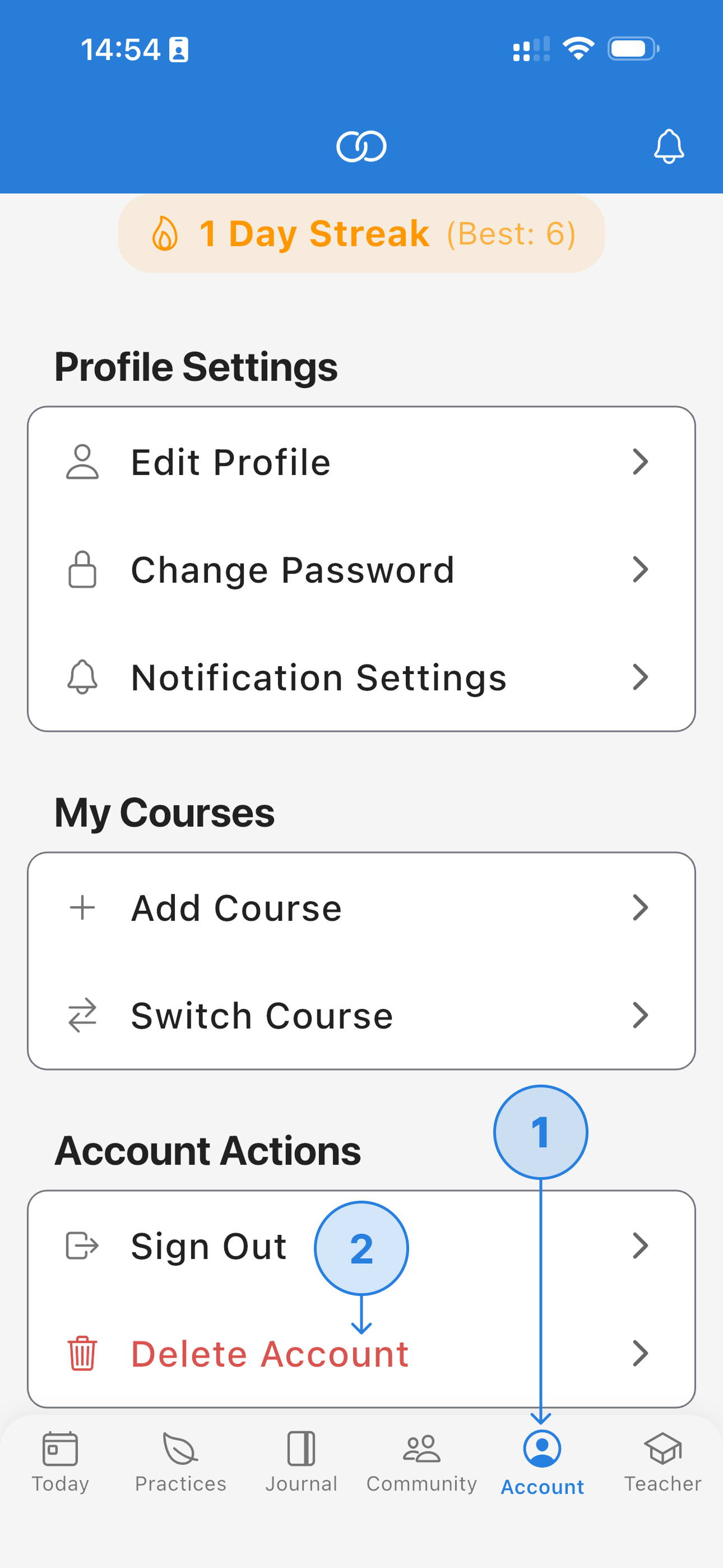
Tap the Account tab (1), then tap Delete Account (2)
Option 2: Request deletion by email
If you can no longer access the app (e.g., you have uninstalled it or lost access to your device), you can request account deletion by email:
- Send an email to privacy@bewellit.com
- Use the subject line: "Account Deletion Request – Mindful Brian"
- Include the email address associated with your account
- We will verify your identity and process the deletion within 30 days
What Happens to Your Data
When you delete your account, the following data is immediately and permanently removed:
| Data type | What happens |
|---|---|
| Account credentials | Deleted Email, password, and authentication record |
| Profile information | Deleted Display name and account settings |
| Course enrollments | Deleted All course memberships removed |
| Wellness data | Deleted Mood logs, journal entries, activity tracking |
| Notifications & preferences | Deleted All notification history and settings |
| Community messages | Auto-deleted All messages are automatically deleted after 90 days regardless of account status |
| Anonymised analytics | Retained Aggregated, non-identifiable usage data may be retained for service improvement |
This action is permanent. Once your account is deleted, your data cannot be recovered. If you are enrolled in an active course, you will lose access to all course content and progress.
Request Partial Data Deletion
If you want to keep your account but remove specific data (e.g., meditation sessions, journal reflections, or community messages), you can:
- Delete individual entries directly within the app
- Email us at privacy@bewellit.com with the subject line "Partial Data Deletion – Mindful Brian" to request removal of specific data categories
We will process partial deletion requests within 30 days in accordance with UK GDPR.
Guest Accounts
If you are using Mindful Brian as a guest (without an email/password account):
- Guest accounts inactive for 6 months are automatically deleted along with all associated data
- To request earlier deletion, email privacy@bewellit.com with your anonymous user ID (found on the Account screen in the app)
Questions?
For any questions about account deletion or your data, please contact us:
BeWell IT Limited
Email: privacy@bewellit.com
Company No: 16095961
Registered in England and Wales
For full details on how we handle your data, see our Privacy Policy.